

If you run a WordPress site and you want to rank on Google, you need an SEO plugin. Without one, you’re flying blind. WordPress out of the box gives you almost no control over how your pages appear in search results, and that’s a problem if you actually want people to find you.
I’ve been building WordPress sites for 15 years. Right now I manage over 100 client sites through my agency, Gecko Media. Over the years I’ve used pretty much every SEO plugin going, Yoast, All in One SEO, SEOPress, a handful of smaller ones that didn’t stick around. The one I ended up standardising on, across every site I build, is Rank Math. I genuinely believe it’s the best SEO plugin on the market right now, and in this post I’m going to tell you exactly why, what I use, what I don’t bother with, and whether the Pro version is worth paying for.
Quick note: Rank Math reached out to me to see if I’d be willing to make a video review on their plugin. I said yes because I was already installing it on every new client build before they asked me. If I didn’t use it, I wouldn’t have agreed. Everything below is my actual workflow from real client work, and my opinions on Rank Math Free vs Pro.
Let’s get into it.
Table of Contents
What Rank Math Actually Is (In Plain English)
Rank Math is a WordPress plugin that gives you control over how your site appears in search engines like Google and Bing. WordPress out of the box gives you almost no way to manage this. You can write pages and posts, but you can’t easily set the title that shows up in search results, the description underneath it, the schema markup that tells Google what your business is, or the sitemap that search engines use to find your content.
An SEO plugin bridges that gap. It doesn’t do SEO for you. Let me say that again because this is where a lot of people get it wrong: installing an SEO plugin doesn’t mean your site is suddenly optimised. What it gives you is the control panel. The actual work, writing good titles, structuring your content properly, earning backlinks, keeping your site fast, that’s still on you.
What Rank Math gives you is a well-designed, genuinely powerful control panel, and it’s the best one I’ve used.
Why I Switched From Yoast (And Never Looked Back)
For years I used Yoast on every WordPress site I built. It was the default. Everyone used it, the WordPress community recommended it, and it did the job. I had no real reason to change.
Then a couple of years ago I kept hearing about Rank Math. So I tried it out on one site to see what the fuss was about. Within minutes of running through the setup wizard, I knew I was switching everything over.
You know when you pick up an iPhone for the first time and you just work out how to use it without needing a manual? That’s how Rank Math felt. Yoast I was always fighting a bit. The interface was clunky, certain features felt deliberately locked behind the Premium upgrade, and some of the advice it gave you was questionable. With Rank Math it felt like the tool was on my side. It walked me through exactly what I needed to set, explained why, and left me alone once it was done.
The other thing that got me: the free version of Rank Math does more than the paid version of some other plugins. That’s not hype. Schema markup, redirections, 404 monitoring, Google Search Console integration, all of that is in the free version. With Yoast you’re paying for a lot of that.
I’ve now migrated all of my client sites from Yoast to Rank Math. Rank Math has a built-in importer so you don’t lose your settings. It takes a few clicks and you’re done.
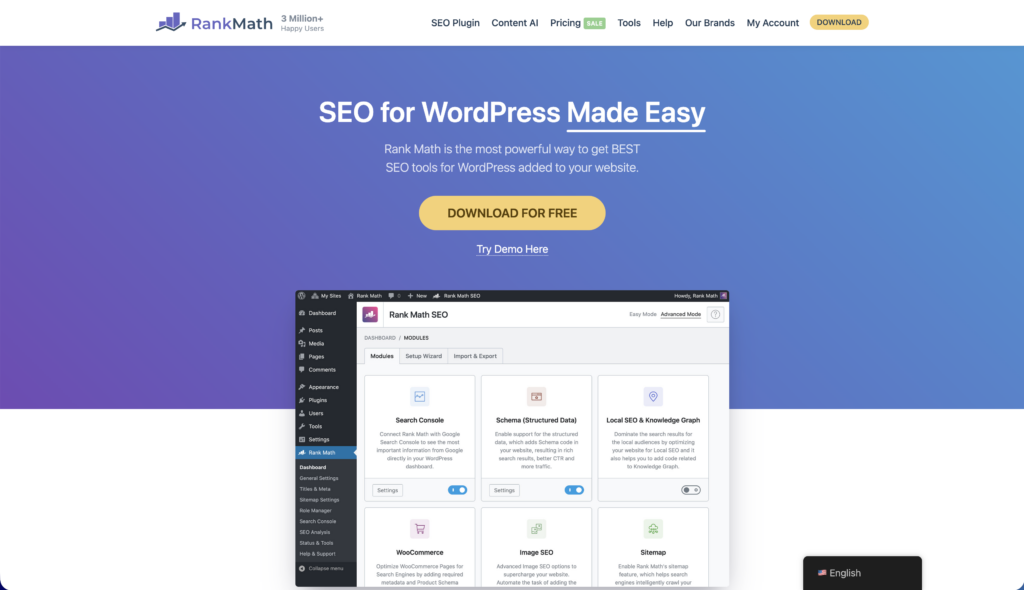
Want to try it for yourself? Grab Rank Math for free from WordPress.org – it’s the version I install on every new client build. If you know you want PRO features straight away, see the current Rank Math PRO pricing here.
Rank Math Free Features I Actually Use On Client Sites
There are about 17 features in the Rank Math free version if you count everything. I’m not going to list them all because you can get that from the Rank Math website. Instead, here’s the stuff I actually touch on a weekly basis across client sites.
Meta Titles And Descriptions
This is the bread and butter. Every page and post gets a custom meta title and description. Rank Math gives you a live preview of exactly how it’ll appear in Google, which is brilliant for spotting when your title is going to get cut off. My rule of thumb: keep titles under 60 characters and descriptions under 160. Rank Math’s live snippet editor tells you the moment you go over.
Schema Markup
This is huge, and it’s free. Schema markup is the structured data that tells Google “this is a local business, this is a product, this is an article”. The free version of Rank Math includes 18 schema types. I use Local Business and Service for most of my client sites. For e-commerce clients I use Product. For blog posts it’s Article. Schema is one of the fastest ways to improve how your site shows up in search results, and getting it right used to be a nightmare. Rank Math makes it point-and-click.
Sitemap Generation
Rank Math generates your XML sitemap automatically and updates it whenever you publish new content. I always check on a new install that the sitemap is being generated and I submit it to Google Search Console as part of my standard setup. It’s one less thing to think about.
Google Search Console Integration
You can connect Rank Math directly to Google Search Console from inside WordPress. Once it’s connected, you get some of your GSC data inside the WordPress dashboard. More importantly, it enables instant indexing, which tells Google about new or updated pages immediately instead of waiting three to six weeks for Google to find them. On brand new sites this is genuinely game-changing.
404 Monitor
This quietly tracks every 404 error on your site and logs it. I check this monthly on client sites because it shows me when visitors are hitting broken links, whether from internal navigation, old external backlinks, or typos. I then use the redirection module to fix them in-place.
Redirections
This is a proper feature in free Rank Math. I use it every time I change a page URL or restructure a site. Without it you’d need a separate plugin like Redirection by John Godley, which is fine, but I prefer having it built into the SEO plugin I’m already using.
Content Analysis And SEO Score
When you edit a post or page, Rank Math analyses your content against your focus keyword and gives you a score out of 100 with specific suggestions. Missing the keyword in the meta description, no internal links, content too short, keyword density off – it flags all of it.
My rule on the score: don’t obsess over it. I aim for green (around 80+) and I stop there. Chasing 100/100 leads to stuffing keywords where they don’t belong and writing unnatural sentences. Google is smart enough to spot that. Write for the reader first, then tick off the SEO boxes where they make sense.
Rank Math Free Features I Don’t Bother With
One of the reasons I like Rank Math is that they pack a lot into the free version, but being honest, I don’t use all of it, and neither will you. Here’s what I leave switched off on client sites, so you know you’re not missing anything important if you skip them too.
AMP. Accelerated Mobile Pages is a dying format. Google has quietly deprecated a lot of its AMP advantages. I haven’t enabled AMP on a new site in years.
BuddyPress and bbPress integration. Both are niche plugins that most sites don’t use. If you’re building a community site on WordPress, sure, enable them. Otherwise leave them off.
Google Web Stories. Web Stories had a moment a couple of years ago and then Google stopped pushing them. I don’t bother.
Role Manager. Useful if you’ve got a multi-user site with editors who shouldn’t be touching SEO settings. On solo-run sites, irrelevant. It can be helpful if you want your customers to have input on certain aspects.
The point isn’t that these features are bad, most of them are genuinely useful for the right kind of site. It’s that Rank Math gives you the choice to use them or ignore them, and the core SEO work happens whether you touch them or not. Install Rank Math, use the setup wizard, enable the bits that fit your site.
Rank Math Free vs PRO: What Actually Changes When You Upgrade
Here’s the section you’re probably here for. Let me give you the honest answer on Rank Math Free vs Pro.
Most of the sites I manage run on the free version of Rank Math and they rank pretty well. The free version covers the fundamentals brilliantly. If you’re a small business owner with one website, a blogger, or someone just starting out, you almost certainly don’t need the Pro version yet.
But there are scenarios where Pro genuinely pays for itself as it makes your job as an SEO much easier, and I’ll get to those in a moment. First, here’s what you actually get when you upgrade.
Rank Math Free vs Pro Feature Comparison
| Feature | Free | Pro |
|---|---|---|
| Meta titles, descriptions, snippet editor | ✅ | ✅ |
| Schema markup (18 types) | ✅ | ✅ (plus custom schema builder) |
| XML sitemaps | ✅ | ✅ (plus news and video sitemaps) |
| Google Search Console integration | ✅ | ✅ (advanced with GA4) |
| 404 Monitor | ✅ | ✅ |
| Redirections | ✅ | ✅ |
| Instant Indexing | ✅ | ✅ |
| Content Analysis (SEO Score) | ✅ | ✅ |
| Focus keywords per page | 5 | Unlimited |
| Keyword Rank Tracker | ❌ | ✅ |
| Google Trends Integration | ❌ | ✅ |
| Content AI | Limited credits | Full access |
| AI Link Genius (auto internal linking) | ❌ | ✅ |
| Advanced Schema Generator | ❌ | ✅ |
| Advanced WooCommerce SEO | ❌ | ✅ |
| Image SEO watermarking | ❌ | ✅ |
| Search Intent Indicators | ❌ | ✅ |
| Automated SEO email reports | ❌ | ✅ |
| Podcast module | ❌ | ✅ |
If you compare that to what other plugins put behind their paywalls, it’s genuinely generous. But let’s talk about which Pro features are actually worth it.
Pro Features That Actually Impress Me
These are the ones I use regularly and would miss if they disappeared.
Google Trends Integration
This is one of my favourite Pro features. It lets you see real search data for your focus keywords directly inside WordPress. With the free version, you’re guessing which keywords to target. With Pro, you’re making decisions based on actual search volume and trend data. If I’m writing a client’s service page and I can’t decide between two keyword variations, I pop them into the Trends tool and let the data decide.
Search Intent Indicators
When you add a focus keyword, Pro tells you whether people searching that term are looking to buy, learn, compare, or navigate. This is massive for writing content that actually matches what people want. There’s no point writing a 2,000 word educational article for a keyword where 90% of searchers are ready to buy – you want a short product page that converts. Pro helps you figure that out before you write.
Keyword Rank Tracker
Monitor where your pages rank in Google for your tracked keywords, inside WordPress, without paying for a separate tool like Semrush or Ahrefs. Not as deep as those tools for serious SEO agencies, but for freelancers and small businesses it’s plenty. I use this to show client progress without having to screenshot from Semrush every month.
AI Link Genius
Automated internal linking. If you’ve ever tried to manually add internal links across a large site, you know it’s tedious. Link Genius scans your content and suggests or auto-inserts relevant internal links where they make sense. Huge time-saver on sites with hundreds of posts.
Advanced Schema Builder
The free version gives you 18 schema types, which is fine for most sites. Pro lets you create completely custom schema beyond the standard types. I’ve used this a couple of times for unusual client needs – things like membership sites, events with multiple dates, and specific product variations. If you never need custom schema, don’t pay for this.
Unlimited Focus Keywords
Free gives you 5 focus keywords per page, Pro gives you unlimited. This matters if you run service pages that legitimately target multiple search phrases. Most pages don’t need more than 2-3 keywords, so for a lot of sites the free limit of 5 is fine.
Pro Features I Barely Touch
Keeping things honest.
Podcast module. Useful if you host a podcast. I don’t. Irrelevant to 99% of agency work.
Google News sitemap. Only matters if you run a news publication that qualifies for Google News. Niche.
Video sitemap. Matters if video is central to your SEO strategy. For most business sites, not needed.
Google AdSense integration. Useful if you run display ads on your sites. I don’t monetise client sites that way.
Image SEO watermarking. A novelty. I’ve never needed it.
If the Rank Math marketing talks up these features and you don’t do any of those things, don’t let them push you towards Pro on the basis of them.
Rank Math PRO Pricing in 2026
Rank Math sells three PRO tiers plus a bundle with WP Rocket. Prices are billed annually. Rank Math discounts the first year and renews at a slightly higher rate, so I’ll list both so there are no surprises later.
Prices below are accurate at time of writing (April 2026). Rank Math run promotions and update their pricing from time to time, so check the Rank Math pricing page for the current rates before you buy.
Rank Math PRO ($71.88/year, renews at $107.88)
The entry tier. Unlimited personal sites, 1,000 tracked keywords, 7,500 Content AI credits, and all PRO features. If you run one to ten of your own websites, this is what you want. Under $6 a month for unlimited personal sites is a no-brainer if you’re doing any serious SEO work.
Rank Math Business ($239.88/year, renews at $335.88)
This is the tier agencies and freelancers managing client sites should get. It covers up to 200 client sites, 20,000 tracked keywords, and 18,000 Content AI credits. If you’re running a small agency like mine, this is the one.
Rank Math Agency ($539.88/year, renews at $779.88)
For larger agencies. 750 client sites, 75,000 tracked keywords, 45,000 Content AI credits. Only worth it if you’re genuinely running more than 200 client sites or tracking more than 20,000 keywords.
Rank Math + WP Rocket Bundle ($107.88/year, renews at $167.88)
This one is worth a mention on its own. For $107.88 in the first year you get Rank Math PRO and WP Rocket (licensed for one site). WP Rocket is the caching plugin I use on every build, it’s normally around $59 a year on its own. The bundle effectively gives you Rank Math PRO for the price of WP Rocket, or the other way round. If you want both plugins and you’ve only got one site, it’s by far the cheapest way in.
→ Grab the Rank Math + WP Rocket bundle here – this is the one I’d pick if I was starting from scratch with a single site.
A quick comparison: Yoast SEO Premium is €99 a year for a single site. Rank Math PRO at $71.88 first year covers unlimited personal sites. That’s before you even consider that Rank Math’s free version already includes features Yoast charges extra for.
Is Rank Math PRO Worth It? (The Agency Answer)
Short answer: yes – if you’re doing SEO seriously. For a solo site owner who just wants their business to show up in Google, free Rank Math is genuinely enough and I’d never push you to pay for something you don’t need. But if SEO is part of your job, or you’re running client work, or you care about staying ahead of competitors, PRO is a no-brainer. At every tier it costs less than the tools it replaces – keyword trackers, schema generators, internal linking tools – so the ROI calculation takes about ten seconds.
Here’s the breakdown by who you are.
If you run one website for your own business
Stay on the free version. Seriously. Free Rank Math covers everything you need for a single business site. Unless you specifically need Google Trends integration or keyword tracking inside WordPress (which you probably don’t if you’re not doing SEO as a job), save your money.
If you run a blog or publisher-style site
Free is still probably fine. The only Pro features that would benefit you are Content AI for content assistance and AI Link Genius for automated internal linking. Both nice-to-haves, neither essential.
If you run e-commerce on WooCommerce
Consider Pro. The advanced WooCommerce SEO features and custom schema are genuinely useful for getting product listings right. If your store is actively trying to compete in organic search, the PRO or bundle price is nothing against the upside. → Check current Rank Math PRO pricing
If you run or work for an agency managing client sites
Get the Business tier. The keyword tracking, the advanced reporting, the unlimited focus keywords – all of it compounds across every client site. I pay for this and I’d pay twice as much without blinking. → Grab Rank Math Business here
If you’re just getting started with WordPress
Start with free. Learn the plugin. Learn SEO. Upgrade when you hit a specific limitation, not before.
Real Results From A Client Site
This is where most Rank Math reviews fall apart, because they’re written by bloggers reviewing it on their own blog. I can show you something different.
One of my client sites, which was built from scratch six months ago, runs on Rank Math free. I did the standard setup: schema, sitemap, GSC integration, instant indexing, meta descriptions on every page. That’s it. No black magic, no paid tools, no extensive link building.
Here’s what the last three months look like:
- 72,700 impressions in Google Search
- Average position improved from 49 to 7.9 on tracked keywords
- Upward trend on every metric Rank Math reports
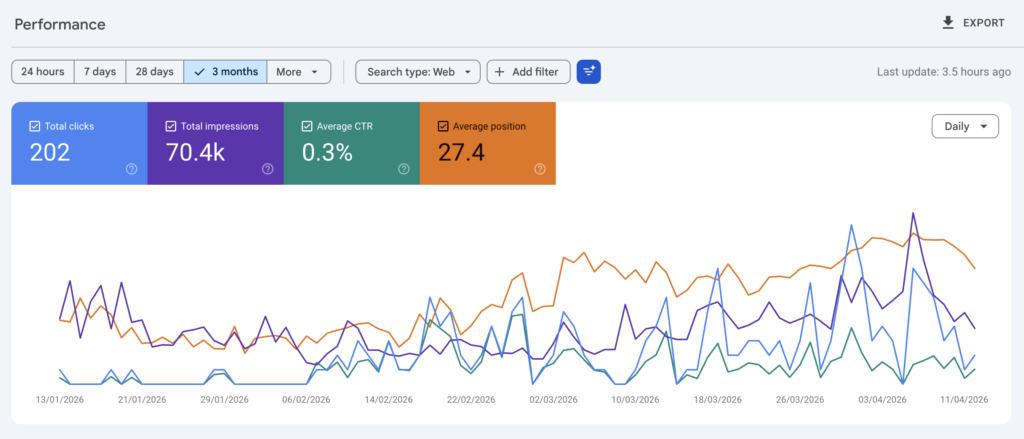
That’s free Rank Math doing its job, plus me consistently applying the basics. No hacks. This is exactly what Rank Math promises and it’s what I see across my other client sites when they follow the same process.
Common Mistakes I See People Make With Rank Math
Installing Rank Math does not equal doing SEO. This is the number one mistake. You have to actually go into each page and post, set the focus keyword, write the meta description, set the schema type, and work through the suggestions. The plugin tells you what to do. You have to do it.
Not setting schema properly. By default, Rank Math might set your posts to “Article” schema. For a local business site you should be setting Local Business. For an e-commerce product page, Product. Schema is free and powerful and completely wasted if you leave it on the defaults.
Obsessing over the SEO score. I mentioned this earlier but it bears repeating. Aim for green, don’t chase 100. Writing for the plugin instead of the reader kills your content.
Keyword stuffing. If you’re reading content back to yourself and the focus keyword sounds unnatural, take it out. Google is smart enough to understand semantically related terms. You don’t need to jam “WordPress SEO plugin” into every paragraph.
Not connecting Google Search Console. This is literally free, takes about two minutes, and gives you data about how Google actually sees your site. Don’t skip it.
Rank Math Free vs Pro: FAQs
Is Rank Math free actually free?
Yes. No time limits, no feature trials that expire, no “upgrade after 30 days” trick. The free version is a proper free version and does more than the paid version of some competitors.
Do I need Rank Math PRO?
If you’re running client sites, a busy e-commerce store, a content-heavy blog, or you care about outranking competitors – yes, PRO pays for itself. The keyword tracking, schema builder, Content AI and AI Link Genius all save you time and money elsewhere. If you run one simple business site and SEO isn’t a priority for you, free Rank Math genuinely has you covered. See PRO pricing here.
Rank Math vs Yoast – which is better?
Rank Math, in my opinion, for three reasons. More features in the free version, cleaner interface, and better value at the paid tier – Rank Math PRO covers unlimited personal sites; Yoast Premium covers one.
Can I switch from Yoast to Rank Math without losing my settings?
Yes. Rank Math has a built-in importer that pulls across your Yoast settings in a few clicks. I’ve done this on dozens of client sites and never had an issue.
Does Rank Math slow down WordPress?
No. Rank Math is lightweight and well-coded. If anything I’ve seen sites get faster after switching from bloated alternatives. Your hosting and how your theme is built matters far more than which SEO plugin you use. (If you want the full picture on WordPress performance, I’ve written about Cloudflare for WordPress and Google’s 2MB HTML limit which are far bigger factors.)
How much does Rank Math PRO cost?
Rank Math sells three PRO tiers – PRO (unlimited personal sites), Business (up to 200 client sites) and Agency (750 client sites) – plus a bundle with WP Rocket. See the pricing breakdown above for current rates, or check the Rank Math pricing page directly. All plans come with a 30-day money-back guarantee.
Is Rank Math PRO worth it for small agencies?
In my experience, yes, at the Business tier. The keyword tracking alone saves me paying for a separate rank tracker, and the advanced reporting is useful for client reviews. I’d pay for it even if I only managed 20 client sites.
Can I upgrade from Free to Pro later?
Yes. You install Pro alongside Free and everything migrates automatically. Your existing settings, focus keywords, and configurations carry across. No data loss.
The Bottom Line
Rank Math is, in my view, the best WordPress SEO plugin on the market. I use it on every new site I build and I’ve migrated all of my client sites to it from Yoast. The free version alone is enough to handle the fundamentals on most sites, and the Pro version adds features that genuinely earn their keep if you’re doing SEO professionally.
If you’re starting out, install the free version from WordPress.org and use the setup wizard. It’ll get you 80% of the way to a well-optimised WordPress site in about ten minutes.
If you’re running an agency or doing e-commerce SEO, the Business tier is one of the easiest ROI calculations in WordPress tooling. You’ll make that back on the first client win.
Ready to upgrade?
→ Get Rank Math PRO here – or grab the Rank Math + WP Rocket bundle if you want both plugins for a single site at the lowest price going.
Both come with a 30-day money-back guarantee, so there’s no risk in trying it.
Want to see exactly how I set it up and use it on a real client site? I’ve recorded a full walkthrough video showing the setup wizard, the content analyser, the real analytics dashboard on one of my sites, and the Pro features I actually use day-to-day. Watch the full video here.
And if you want to learn WordPress properly – from someone who actually builds sites for a living – come and join the free community at WP Odyssey. We’ve got quests covering WordPress foundations, SEO, security, speed, and agency workflows. Free tier gets you Quests 00-02 and a weekly Q&A call with me every Friday at 4pm CET.
This post was sponsored by Rank Math. The opinions and real-world experience are entirely my own. I was already using Rank Math on every client site before they asked me to write this. If you buy Rank Math PRO through the links in this post, I may earn a commission at no extra cost to you.