

In early February, Google updated its crawler documentation with a significant change: the Google 2MB HTML limit. The general crawl limit had been suspected to be as high as 15MB since 2022. The updated Googlebot page now specifies 2MB for HTML files. Google says this is not a behaviour change, just clearer documentation.
The SEO community over on X and Reddit noticed, people started testing and the conversation grew from there with a lot of speculation. There were a lot of threads, all with their unique take on things.
Then on March 31st, Google put it in writing properly. Gary Illyes published a detailed blog post on the Google Search Central Blog titled “Inside Googlebot: demystifying crawling, fetching, and the bytes we process.” It confirmed the 2MB limit for HTML and laid out exactly how Googlebot fetches and processes web content.
So what does this mean? Googlebot fetches the first 2MB of your HTML document. If it’s larger than that, it doesn’t reject the page. It just stops reading at the 2MB mark. Everything after that cutoff is not fetched, not rendered, and not indexed. External resources like stylesheets and JavaScript files each get their own separate budget. This is specifically about the HTML document itself.
For most well-built sites, this will never be a problem. But if you’re running a WordPress site with a page builder, multiple plugin packs, and years of accumulated bloat, you might be closer to that limit than you think. Or worse, over it.
Table of Contents
I tested my own sites for the Google 2MB HTML limit and here is what I found
At Gecko, we currently manage over 100 WordPress websites. When this news broke, I went through a load of them and checked the HTML output size.
Every site I built came back at around or under 200KB. Clean theme, minimal plugins, no builder bloat. The biggest was around 270KB. Most were well under 200KB.
Then I checked a site that I had worked on a few years ago. A site I knew had size issues as I had been hired to speed it up. One of the issues with the site was a large DOM size – it was built using Elementor. The site in question was nutramission.com. I’ve worked on this site a few times but I did not build it. It is Elementor heavy, enormous DOM, lots of sections and styling baked into the markup.
The test results: 2.58MB. Over the limit.
Same WordPress. Same CMS. Same type of hosting. The difference is entirely in how the site was built. So unfortunately for this website, around 25% of the page is invisible to Google. If any important information like your meta title, description, tags, schema or even content is tucked away deep inside the page, it may not get picked up in the Google scan. And if Google can’t see it, you’re not ranking for it.
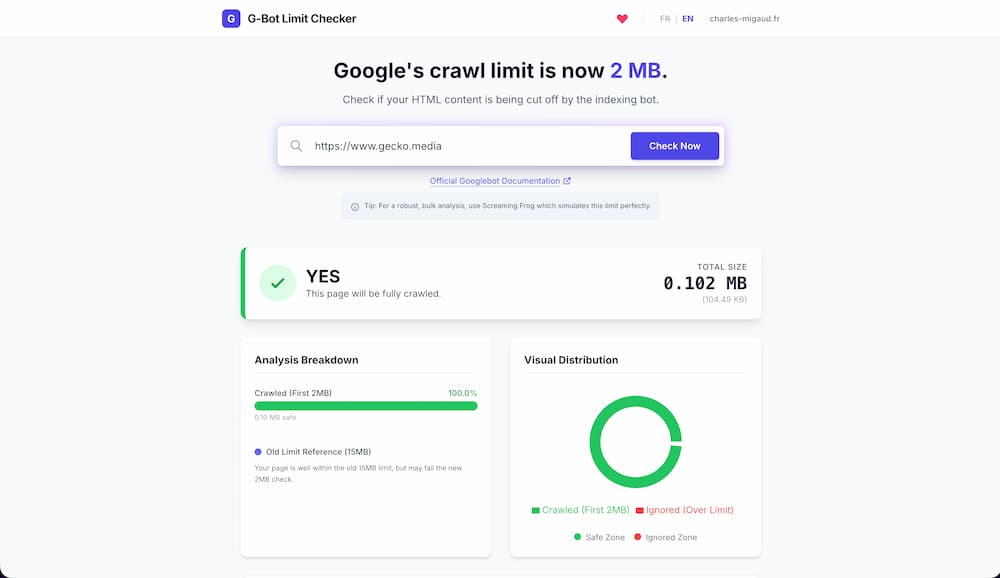
You can test your own pages using the free G-Bot Limit Checker tool. It checks whether your page HTML fits within Google’s 2MB crawl limit. Takes two seconds.
Why WordPress sites are most at risk
WordPress itself isn’t the problem. A clean WordPress build can be fast, lean, and very search-friendly. I build them every week and I know what a clean site looks like under the hood.
The problem is what a lot of WordPress sites become over time. And I see this constantly across client sites that come to us.
A theme gets layered on top of a builder. Then add-on packs get installed. Then a few convenience plugins. Then some custom snippets. Then tracking scripts. Then popups. Then inline CSS from builder settings. Then old blocks and templates that were never properly cleaned up.
By the time someone decides to “do SEO”, the page might look absolutely fine on the front end but the source underneath is a complete mess. And here’s the thing. Google doesn’t rank the pretty visual editor. It has to deal with the actual source output. What you see and what Google sees are two very different things.
What actually causes the bloat
Page builders generating huge markup. I see this all the time. One section in Elementor or Divi can turn into dozens of lines of source code. Multiply that across a full page with 10 or 15 sections and it adds up fast. In fact, Elementor themselves have acknowledged this. One of the headline features of Elementor V4 is cleaner HTML output with less bloat. If the Elementor themselves are shipping a major update to fix this problem, that tells you everything you need to know about how much bloat previous version of Elementor is generating.
Inline CSS everywhere. Global styles, responsive tweaks, animation settings. All of these can end up written directly into the HTML. What feels like harmless visual tweaking in the builder is quietly ballooning the page size behind the scenes.
Too many plugins doing too many things. Widget packs, sliders, popups, review plugins, accordions, tabs, marketing tools. They all add their own code. On their own they seem fine. Stack five or six of them together and it’s a mess.
Scripts and tracking that nobody cleaned up. GTM, chat widgets, booking widgets, marketing embeds, social embeds. I’ve audited sites with scripts from tools they stopped using two years ago still loading on every page.
Pages that try to do everything. Massive homepages with 20 sections. Service pages that scroll forever. More sections doesn’t mean more value. It usually just means more bloat.
When the source gets heavy, the things you actually care about get buried. Your content, your internal links, your schema, your headings. All of it becomes less prominent to Google. Even if you’re under 2MB, you’re still making Google work harder than it needs to. And Google doesn’t owe you the effort.
What to do about it
If you think bloat might be an issue, don’t start by chasing clever SEO hacks. Start with the build itself.
Clean up the builder. Go through your key pages and remove anything that’s just decorative noise. Old sections, unused columns, template leftovers. Every element in your page builder is markup in your source code. If it’s not earning its place, get rid of it.
Cut the plugin excess. If you’ve got three plugins doing overlapping jobs, that needs sorting. I use Admin and Site Enhancements (ASE) on every client site because it replaces ten or more single-purpose plugins with one. Fewer plugins means less junk in the output.
Move CSS and JavaScript to external files. This is Google’s own recommendation from the blog post. Inline styles and scripts bloat your HTML directly. External files get their own separate 2MB budget each. So get them out of the HTML.
Get the important stuff higher up. Your main heading, your core message, your primary call to action. These need to be high enough in the source structure that Google hits them early. If your H1 is buried under 600 lines of builder wrapper divs, that’s a problem worth fixing.
Stop thinking your SEO plugin will save you. I use Rank Math on every client site and it’s brilliant. But Rank Math, Yoast, none of them can fix bloated output or a messy build. That’s on the site itself. No SEO plugin is going to optimise its way out of a 2MB HTML document.
The bottom line
This isn’t a panic situation. Google confirmed that over 99% of sites fall comfortably under the 2MB limit. If your site is well-built, you’re probably fine.
But probably fine isn’t definitely fine. And checking takes two minutes. Head to the G-Bot Limit Checker and test your homepage and your key landing pages. If they’re clean, great. If they’re not, now you know.
Start with what Google actually sees. Not what your visual editor shows you.